
Net Nanny for Android2.3.4.0 - Get APK
You'll be able to download in few seconds.
Publisher Description
The original, award-winning Net Nanny™ parental controls is now available for Android. Give your child the freedom to surf the Internet without the fear of inappropriate content. Net Nanny is a custom mobile browser that becomes your child’s default browser. Manage which apps your child can or cannot use on their mobile device. Manage your child’s settings and devices, view reports, add users and much more from the web-based console. Simply follow the installation instructions and create a user profile for your child on his or her device. Use one of the pre-defined age-based user profiles or customize settings to include categories you create or specific sites you wish to block or allow.
APPLICATION MANAGEMENT
Show which apps are installed on the protected mobile device. Parents can block unwanted apps, see when new apps are installed, and even prevent new apps from running until approved.
AGE-APPROPRIATE FILTERING
Choose from among four pre-defined, age-appropriate user profiles for your filter settings: Child (ages 7 and under), Pre-teen (ages 8-12), Teen (ages 13-17), Adult, or customize your own settings.
18 FILTERING CATEGORIES
Each category can be configured to Block, Warn or Allow access to a page containing content in that category. Parents can also create their own custom categories.
STRICT SAFE SEARCH ENFORCEMENT
This app enforces the strictest safe search setting on all popular search engines.
ANTI-CIRCUMVENTION
Once installed, kids must use the Net Nanny browser. Other browsers cannot launch. Administrator credentials are required to uninstall the app. It also prevents most common task killers and app managers from stopping or uninstalling the app. SSL proxy sites are filtered. Strong uninstall and anti-circumvention tools ensure your child is always protected.
REAL TIME CONTEXTUAL ANALYSIS
Web pages are categorized in real time, including brand-new web sites and sites with user-generated content, such as comments or posts. With over 150,000 new web pages each day, traditional list-based filters cannot adequately protect your family.
SSL FILTERING
Filter HTTPS sites using real time contextual analysis
PROFANITY MASKING
Swear words are replaced with characters (@#$%) so web pages with otherwise-appropriate content can still be viewed.
REMOTE WEB-BASED MANAGEMENT
Administrators can manage any number of users and devices from a web-based console. Log in at admin.netnanny.com to manage your family’s settings and account. Setting changes are reflected on the device in under a minute. You can also manage your Windows, Mac, or iOS users from the same console and the user and family settings will work across all four products.
TIME CONTROLS (WEB BROWSING)
Set when and how long (per day or per week) that your child will be allowed to browse the internet using their protected Android device.
CUSTOM WHITELIST AND BLACKLIST
Create custom lists for sites that should always be allowed (whitelist) or always be blocked (blacklist). Parents can also permanently override a blocked site on the device.
WIFI AND 3G/4G/LTE PROTECTION
Your child’s mobile device is protected no matter what network they are using.
ACTIVITY REPORTS
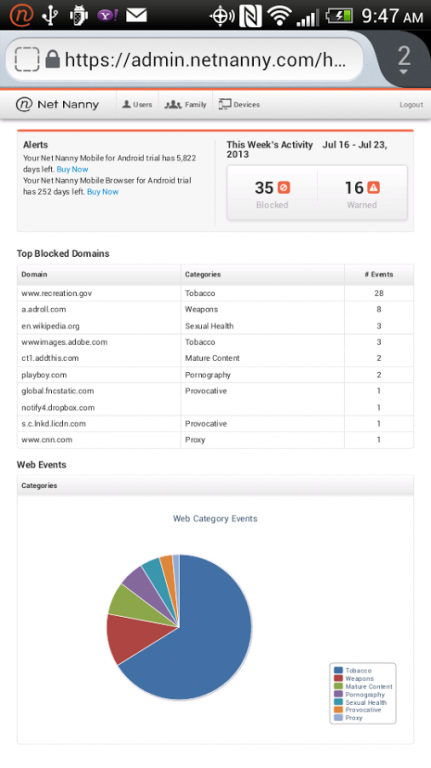
Use the web-based Admin Console to view top web pages visited, blocked categories and alerts.
EMAIL ALERTS
Receive email notifications whenever a site is blocked, a block is overridden, or other events occur
About Net Nanny for Android
The company that develops Net Nanny for Android is ContentWatch, Inc.. The latest version released by its developer is 2.3.4.0.
To install Net Nanny for Android on your Android device, just click the green Continue To App button above to start the installation process. The app is listed on our website since 2016-05-25 and was downloaded 0 times. We have already checked if the download link is safe, however for your own protection we recommend that you scan the downloaded app with your antivirus. Your antivirus may detect the Net Nanny for Android as malware as malware if the download link to com.contentwatch.ghoti.cp.browser is broken.
How to install Net Nanny for Android on your Android device:
- Click on the Continue To App button on our website. This will redirect you to Google Play.
- Once the Net Nanny for Android is shown in the Google Play listing of your Android device, you can start its download and installation. Tap on the Install button located below the search bar and to the right of the app icon.
- A pop-up window with the permissions required by Net Nanny for Android will be shown. Click on Accept to continue the process.
- Net Nanny for Android will be downloaded onto your device, displaying a progress. Once the download completes, the installation will start and you'll get a notification after the installation is finished.
Program Details
System requirements
Download information
Pricing
Version History
version 2.3.4.0
posted on 2016-05-25
* New Feature: Net Nanny has reports for online web searches, these reports are visible in the Parent Admin Console.,* Improved accuracy in filtering encrypted websites and content,* Enhancements to make the App faster and more dependable,Manage settings at https://admin.netnanny.com
version 2.0.2.4
posted on 2013-03-08
Several fixes and updates
Disclaimer
External Download
We do not host Net Nanny for Android on our servers. We did not scan it for viruses, adware, spyware or other type of malware. This app is hosted by Galad and passed their terms and conditions to be listed there. We recommend caution when installing it.
The APK Download link for Net Nanny for Android is provided to you by apps112.com without any warranties, representations or guarantees of any kind, so access it at your own risk.
If you have questions regarding this particular app contact the publisher directly. For questions about the functionalities of apps112.com contact us.
